Home / Guides / USDT invoice template
USDT invoice template
This article is for general information only and is not legal or tax advice. Review every template before you send it to a client.
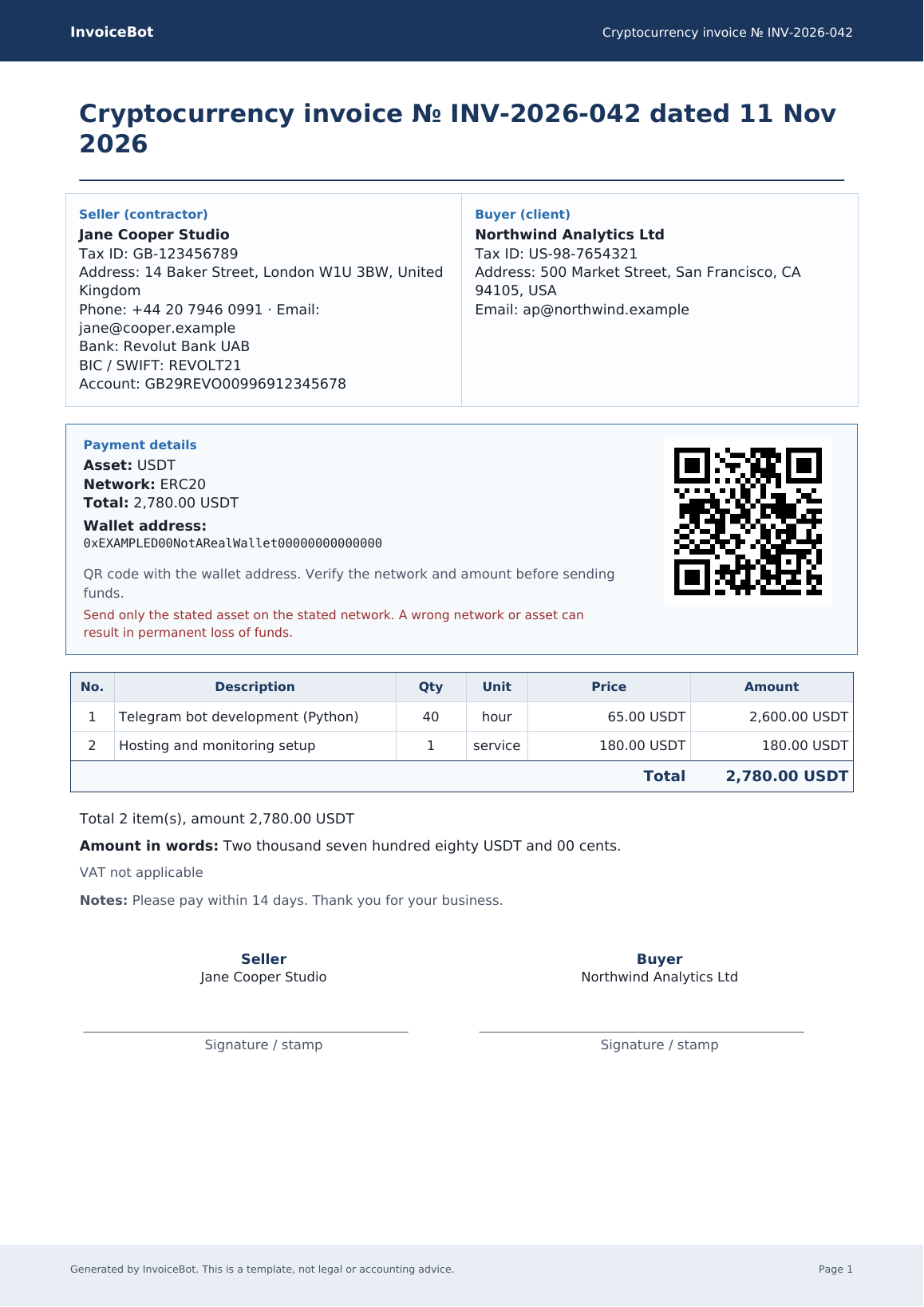
If a client pays in Tether (USDT) or USD Coin (USDC), a normal freelancer invoice is missing three fields that matter more than the logo: the asset, the network, and the public address. This template adds them, plus a warning not to include keys.
What is in the template
- Invoice number, date, and the usual “from / bill to” block.
- A payment panel for the asset, the network, the amount and a public wallet address.
- A line-item table and totals.
- A reminder that a transfer on the wrong network or to a typo is usually irreversible.
A QR code is easier to generate than to draw in Word. After you fill the other fields, you can create the PDF in the free generator, which stamps a QR of the address automatically.
Download
Word template (DOCX) and filled-in PDF sample. More files are on the templates page.
How to fill it in safely
- Write the network in full (for example “TRC-20”, not just “Tron” if you might be misunderstood).
- Paste the address; do not type it from memory.
- Never send a seed phrase “so the client can check the wallet”. That request is a scam.
- Say in writing that the invoice is for payment details only and is not tax advice. How you report crypto income depends on where you live.